1. Mass Duplicate Company Creation
The most devastating error users report is the creation of thousands of duplicate companies in ConnectWise when enabling two-way sync.
Why it happens: Some integrations deduplicate companies based on exact name matches. When "Company ABC" in HubSpot meets "Company ABC Inc." in ConnectWise, the system creates a new record instead of recognizing them as the same entity. Without a unique identifier matching, like a company domain or ID, this pattern can repeat across your entire database. This results in users having to roll back entire databases and manually delete thousands of duplicates — a costly and time-consuming fix.
How SyncSmart prevents this: Our platform uses intelligent matching that go beyond simple name matching. We identify companies using multiple data points. Our change detection technology also ensures that we only sync data that has been updated, preventing the cascade effect that creates mass duplicates. We also offer guided implementation, including a thorough testing phase, to help avoid duplicate errors.
2. Contact Sync Permission Blocks
Users frequently encounter a dropdown menu for "Choose ConnectWise Manage Default Email Type" that won't respond to clicks, completely blocking contact synchronization.
Why it happens: This occurs when the ConnectWise API user lacks proper member permissions. The native integration doesn't communicate permission requirements or provide guidance when permissions are missing.
How SyncSmart prevents this: During our available guided implementation, we verify all necessary permissions are in place before initiating any sync. Our platform provides clear error messages if permissions are missing, telling you exactly which settings need adjustment. No mysterious dropdown failures, just clear communication about what's required.
3. Pipeline Stages Won't Appear for Mapping
When setting up deal sync, users find that no pipeline stages are available from ConnectWise in the mapping interface, blocking the entire opportunity sync process.
Why it happens: This occurs when specific table permissions aren't configured in ConnectWise or when the Primary Sales Rep field is missing. Users need to add opportunity tables in Security > Table Setup with proper read/write permissions, but the native integration doesn't provide this guidance upfront.
How SyncSmart prevents this: Our guided implementation process checks for all required permissions and configurations before you begin mapping. We provide clear prerequisites and verify that pipeline stages are accessible before attempting any sync. If permissions are missing, we tell you exactly which tables and settings need adjustment.
4. Autonomous Contact Reassignment
Perhaps the most alarming error is that the integration randomly moves contacts between different companies without any user action, thereby corrupting business relationships.
Why it happens: The flawed company-matching logic that creates duplicates also triggers incorrect contact reassignments. When the system can't correctly identify companies, it makes autonomous decisions about where contacts belong.
How SyncSmart prevents this: Our enterprise architecture ensures data integrity through isolated customer environments and smart matching technology. We never make autonomous changes to your data relationships. Every sync action is logged and traceable, so you always know exactly what changed and why.
5. Opportunities Sync Without Values or Products
Users report that while opportunities are transferred between systems, they often arrive stripped of essential data — including monetary values and associated products, making sales tracking impossible.
Why it happens: The native integration has fundamental gaps in field mapping for opportunity data. Critical sales information, such as deal values and product line items, doesn't transfer, leaving you with hollow opportunity records that provide no business insight.
How SyncSmart prevents this: Our platform supports comprehensive field mappings, including opportunity values, products, and all associated sales data. We ensure every critical field transfers correctly between systems. Our pre-built mapping templates include all standard opportunity fields, and our Logger alerts you immediately if any expected data fails to sync.
Fix ConnectWise HubSpot Sync Errors with Real-Time Monitoring
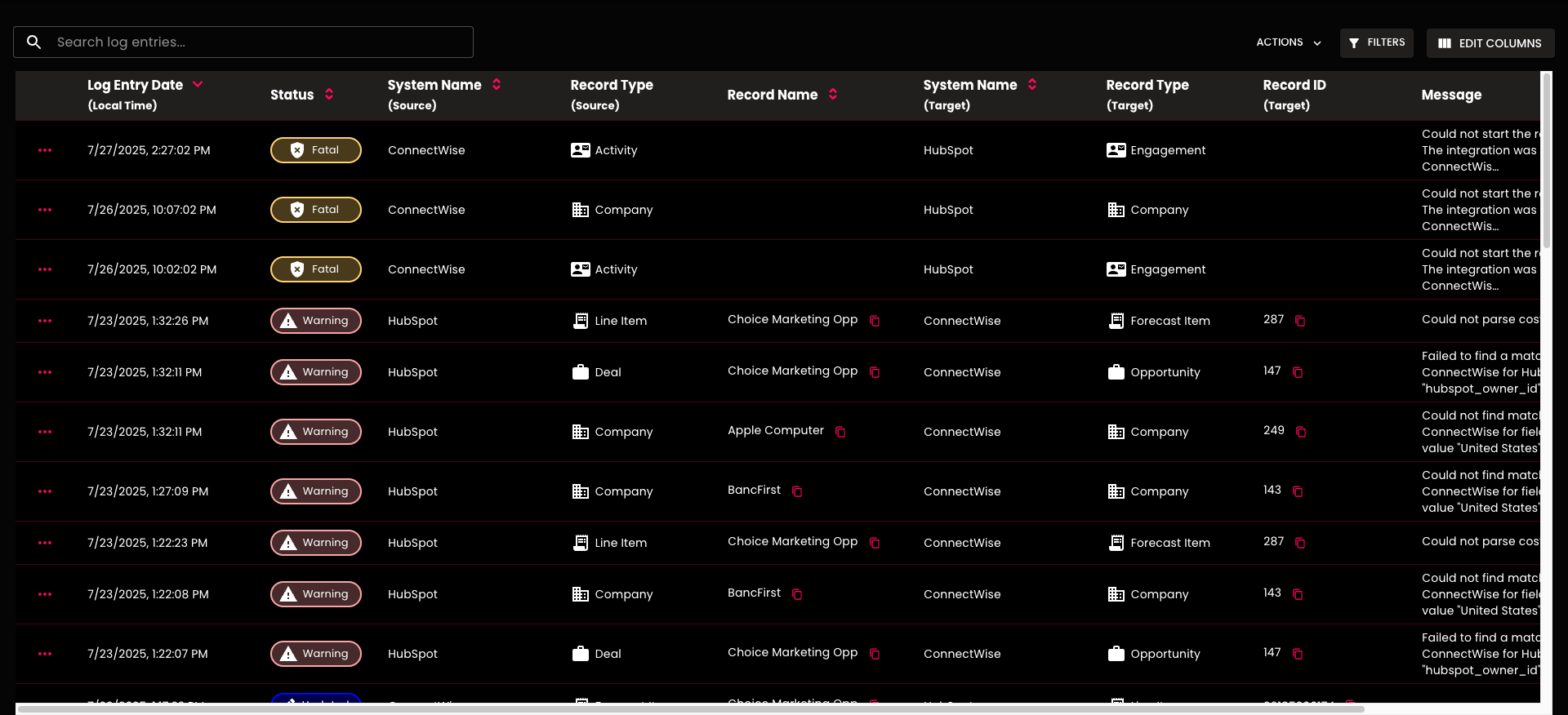
The key to preventing sync disasters is visibility. Our Logger provides complete transparency into every data movement. You can also get alerts sent directly to your email.
Your dashboard shows:
- Exact timestamp for every sync action
- Status levels (fatal, warning, updated), so you know urgency
- Source system and record type
- Target system and intended destination
- Detailed error messages explaining exactly what happened
Example log entry:
- Log entry: 7/23/2025, 10:47:38 AM
- Status: Warning
- System Name (Source): ConnectWise
- Record Type (Source): Opportunity
- Record Name: Test!
- System Name (Target): HubSpot
- Record Type (Target): Deal
- Record ID (Target): 40710749712
- Message: Could not map ConnectWise field "Primary Sales Rep" because the corresponding member could not be found in HubSpot.
ConnectWise HubSpot Integration Support from SyncSmart
When you spot an issue in the Logger, our support system is built right into the interface. Submit a ticket with:
What happened vs. what you expected- Links to records in both systems
- Screenshots from the Logger
- Any relevant context
Our support team responds quickly because we have all the necessary information to diagnose and resolve issues promptly.
Prevent ConnectWise HubSpot Sync Errors Before They Happen
See how we reduce sync stress by scheduling a demo of our Logger dashboard and ConnectWise HubSpot integration.