crm + erp
NetSuite + HubSpot integration
Create NetSuite quotes and sales orders from HubSpot deals, with customers and contacts synced both ways.


From a HubSpot deal to a NetSuite quote or order.
Keep the sales workflow in HubSpot while preparing the transaction in NetSuite.
Map the sale
Use the configured customer, product, and line item fields for the quote or order action.
The customer relationship can move both ways.
Supported company and contact fields have separate bidirectional mappings. Sales-record directions depend on the configured flow.
What syncs between NetSuite and HubSpot
The record pairs and directions for this connection. Read each row for its supported scope.
|
| Direction |
|
|---|---|---|
| NetSuite organizationsConnect customers, leads, prospects, vendors, and partners using the entity types and field directions selected for your configuration. | NetSuite organizations and HubSpot companies, both directions | HubSpot companies |
| NetSuite contacts and person entitiesMap contacts, person customers, and person vendors, including supported related company data. | NetSuite contacts and person entities and HubSpot contacts, both directions | HubSpot contacts |
| NetSuite sales recordsMap opportunities, quotes, sales orders, and invoices to the agreed deal pipelines and stages. Direction depends on the configured record flow. | NetSuite sales records and HubSpot deals, both directions | HubSpot deals |
| NetSuite quotes and sales ordersCreate a NetSuite quote or sales order directly from a HubSpot deal using the configured customer and sales data. | HubSpot deal actions to NetSuite quotes and sales orders | HubSpot deal actions |
| NetSuite productsMake NetSuite product data available in HubSpot for supported catalog and quoting workflows. | NetSuite products to HubSpot product catalog | HubSpot product catalog |
| NetSuite line item dataConnect quantities, prices, and discounts for the configured deal, quote, and order flows. Field direction is set in the mapping. | By configured flow | HubSpot line items |
| NetSuite activitiesShow configured NetSuite activity and engagement information alongside CRM records. | NetSuite activities to HubSpot timeline | HubSpot timeline |
| NetSuite saved searchesUse saved-search membership to build CRM audiences from criteria maintained in NetSuite. | NetSuite saved searches to HubSpot lists | HubSpot lists |
What teams do with NetSuite + HubSpot
- 01
Move from deal to order
Prepare the sale in HubSpot, then create its NetSuite quote or sales order using mapped customer and line item data.
- 02
Follow up with financial context
Use synced invoice and transaction information to help sales and account teams coordinate their next conversation.
- 03
Build ERP-informed audiences
Turn a NetSuite saved search into a HubSpot list for targeted campaigns and customer follow-up.
- 04
Keep customer details aligned
Apply the agreed field ownership and direction rules when either team updates a connected customer record.
- Give sales and finance a connected view of customers and transactions.
- Create quotes and sales orders from the HubSpot deal your team already uses.
- Use ERP data to build more relevant follow-up and marketing audiences.
Custom fields and records
Extend the agreed configuration with custom fields and supported custom record mappings, including their relationships.
What you control in NetSuite + HubSpot
Explore the controls listed for this connection. Screens show ConnectWise + HubSpot; your record types and fields follow the mappings described here.
Every field has a direction.
Map standard and custom fields; choose both directions or one for each.
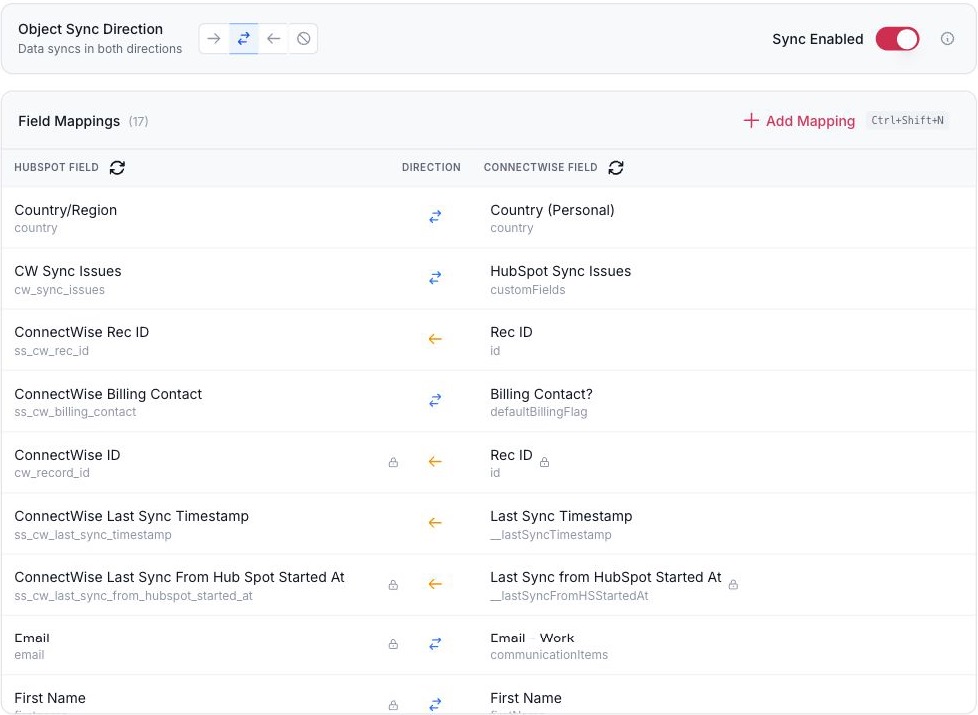
- The direction for the whole object.
- Each field has its own direction.
- Add a mapping for a standard or custom field.
Field mappings for one record pair. ConnectWise + HubSpot shown.
Decide which system wins.
Pick the system of record for a field and whether a blank may overwrite a value.
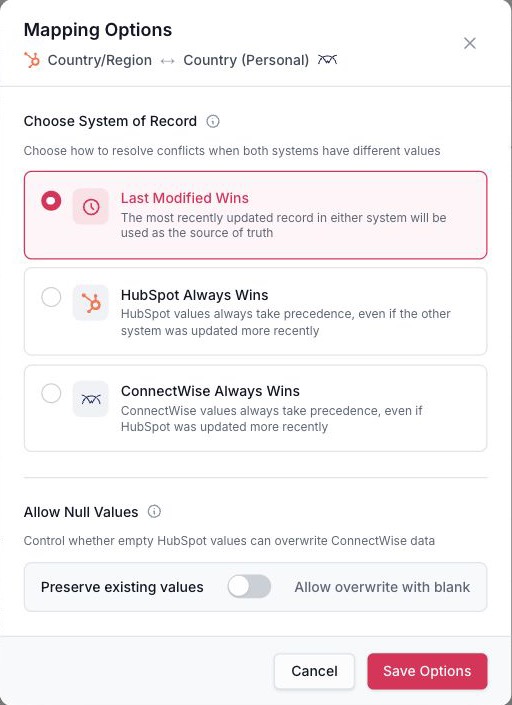
- Which system wins when both change.
- Whether a blank may overwrite a value.
Conflict and blank-value rules for one field. ConnectWise + HubSpot shown.
Sync only the records that qualify.
Build conditions with AND and OR and test them before you publish.
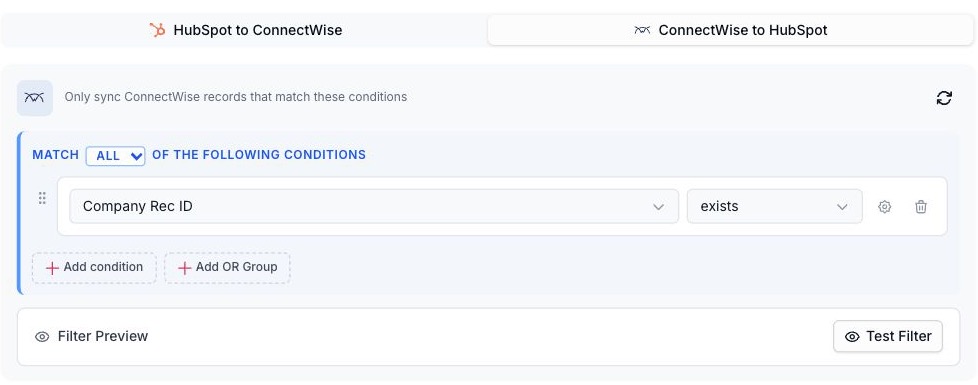
- Combine conditions with AND and OR.
- Test the filter before you publish.
Conditions that decide which records sync. ConnectWise + HubSpot shown.
Use a HubSpot list as the scope.
Sync only the records in a list your team already maintains.
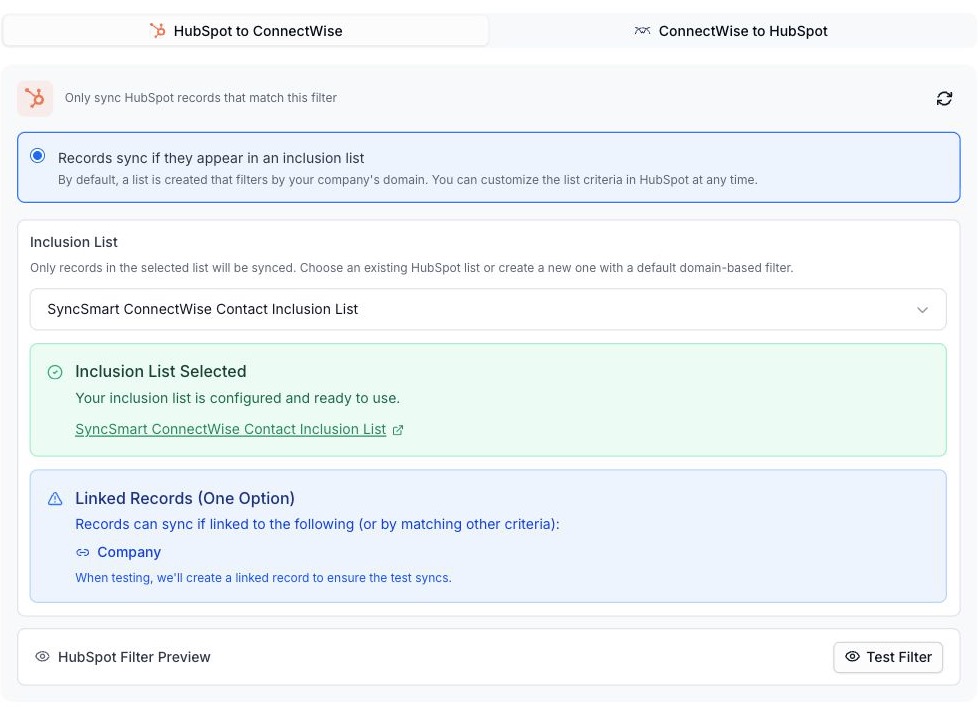
- Sync only the records in a HubSpot list your team already maintains.
- Linked records can qualify too.
A HubSpot list decides which records sync. ConnectWise + HubSpot shown.
See every sync.
Search by record and filter by status, direction and object.

- Search by record.
- Filter by status, direction, and object.
Sync logs. ConnectWise + HubSpot shown.
From first call to first sync
Connect, configure and validate the workflow before rollout.
-
Define the record flows
Choose NetSuite entity types, HubSpot objects, sales processes, and the direction each field should move.
-
Connect and configure
Work with the implementation team to authorize the systems, configure mappings, and set filters and rules.
-
Validate existing data
Review matching, relationships, and any agreed historical sync against representative customer and transaction records.
-
Publish and monitor
Publish the reviewed configuration and use sync logs and configuration history to manage the connection.
Before you connect NetSuite and HubSpot
Prerequisites, scope and the details that depend on your setup.
Ask on a callDoes data sync in both directions?
Supported customer, contact, and sales flows can work in both directions. Configure direction and field ownership for each mapping; every object does not need the same rules.
Can sales create NetSuite records from HubSpot?
Yes. The deal extension supports creating NetSuite quotes and sales orders from HubSpot deals using the agreed configuration.
Can we include custom fields or records?
Custom fields and supported custom record mappings can be included. Review required fields, relationships, and object access during implementation.
Can we choose which records sync?
Yes. Filters and inclusion lists help define the records included in the configured integration.
Can existing records be synchronized?
NetSuite-to-HubSpot historical loads use a NetSuite Saved Search ID after the first deployment. Plan matching rules, scope, and validation with the implementation team before running the load.
How do we investigate a sync or configuration change?
Use sync logs to review record activity. Mapping changes can be saved as drafts and published with version history and deployment controls.
What should we confirm before setup?
Agree entity types, sales flows, custom records, and any historical sync. Have a NetSuite administrator and confirm the HubSpot features your objects require.
Which direction does data move?
Bidirectional customer fields; sales-record direction follows the configured flow. Products move from NetSuite to HubSpot.
Guides, demos and customer stories.
Discuss your NetSuite + HubSpot setup.
Tell us how your team uses NetSuite and HubSpot, which records need to move, and what should happen between them.
Thanks. Your request is with the SyncSmart team.
We reply by email to the address you gave. If you would rather talk sooner, pick a time on the calendar.
Book a 30-minute callYour request did not send.
Email [email protected] with what you need to connect, or pick a time on the calendar and we will take it from there.
Or book a 30-minute call
A 30-minute call on the calendar. You pick the slot; the invite arrives by email.