sales + service
ConnectWise + HubSpot integration
Keep ConnectWise PSA companies, contacts and opportunities matched with HubSpot, in both directions.


Keep the opportunity connected to the deal.
Coordinate the sales context used by your HubSpot and ConnectWise PSA teams.
Align the sales process
Map the opportunity fields, stages, owners, and related customer records.
Direction depends on the record.
Products move from ConnectWise to HubSpot. Supported notes move from HubSpot to ConnectWise; activity types require their own configuration.
What syncs between ConnectWise and HubSpot
The record pairs and directions for this connection. Read each row for its supported scope.
|
| Direction |
|
|---|---|---|
| ConnectWise contactsMap contact details and supported custom fields, with direction and field ownership set for your configuration. | ConnectWise contacts and HubSpot contacts, both directions | HubSpot contacts |
| ConnectWise companiesKeep configured company fields and customer relationships aligned across both systems. | ConnectWise companies and HubSpot companies, both directions | HubSpot companies |
| ConnectWise opportunitiesConnect opportunity and deal data, including configured stage and owner mappings. | ConnectWise opportunities and HubSpot deals, both directions | HubSpot deals |
| ConnectWise forecastsConnect the forecast and line item information used by the agreed opportunity workflow. | ConnectWise forecasts and HubSpot line items, both directions | HubSpot line items |
| ConnectWise productsBring the ConnectWise product catalog into HubSpot for supported product and pricing workflows. | ConnectWise products to HubSpot products | HubSpot products |
| ConnectWise activitiesSupported activity types and direction are configured separately. Activity sync requires configuration; email, call, meeting, and task support depends on the selected flow. | By activity type | HubSpot engagements |
| ConnectWise notesSend supported HubSpot notes to ConnectWise as part of the configured note workflow. | HubSpot notes to ConnectWise notes | HubSpot notes |
What teams do with ConnectWise + HubSpot
- 01
Coordinate the sales handoff
Connect the HubSpot deal to its ConnectWise opportunity, company, and contact so the next team has the mapped sales context.
- 02
Quote from connected product data
Use products synchronized from ConnectWise in HubSpot and connect the supported line item and forecast fields.
- 03
Keep account details aligned
Apply field ownership rules when sales or service updates a contact or company.
- 04
Target customer follow-up
Use synchronized company and opportunity data in HubSpot audiences, workflows, and reporting.
- Keep contact and company information aligned across sales and service.
- Connect HubSpot deals to ConnectWise opportunities and forecasts.
- Give sales access to the product information used by the service business.
Dropdown consistency
Keep supported dropdown values aligned as part of the mapped configuration.
What you control in ConnectWise + HubSpot
Explore the controls listed for this connection. Screens show ConnectWise + HubSpot; your record types and fields follow the mappings described here.
Every field has a direction.
Map standard and custom fields; choose both directions or one for each.
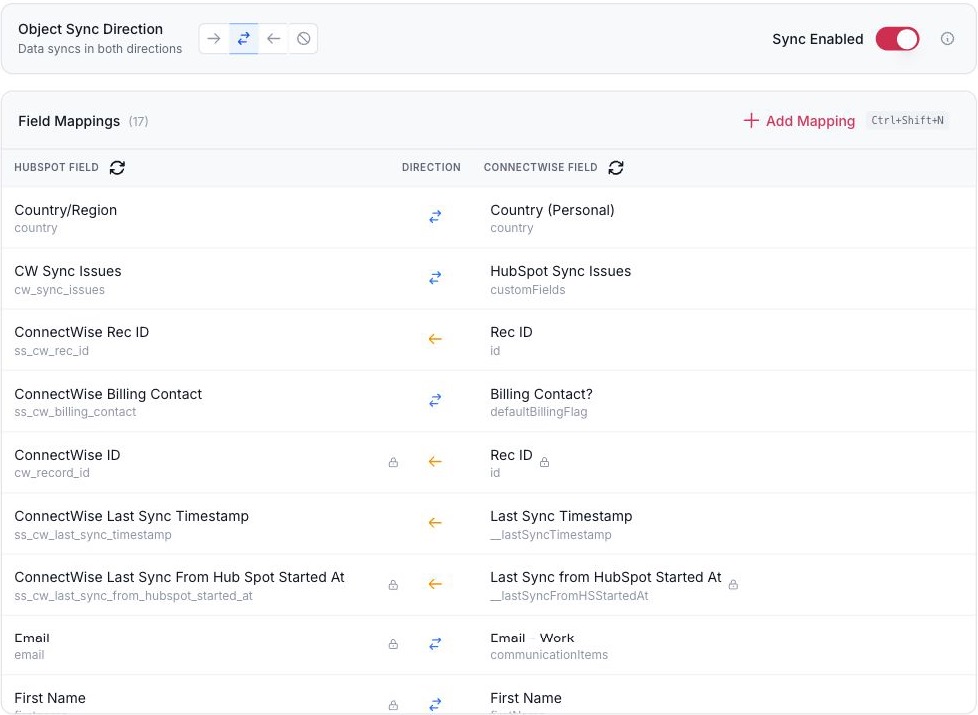
- The direction for the whole object.
- Each field has its own direction.
- Add a mapping for a standard or custom field.
Field mappings for one record pair. ConnectWise + HubSpot shown.
Decide which system wins.
Pick the system of record for a field and whether a blank may overwrite a value.
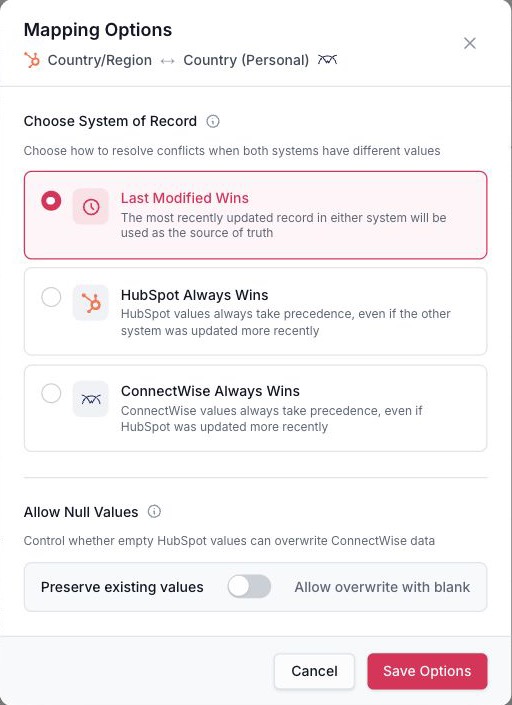
- Which system wins when both change.
- Whether a blank may overwrite a value.
Conflict and blank-value rules for one field. ConnectWise + HubSpot shown.
Sync only the records that qualify.
Build conditions with AND and OR and test them before you publish.
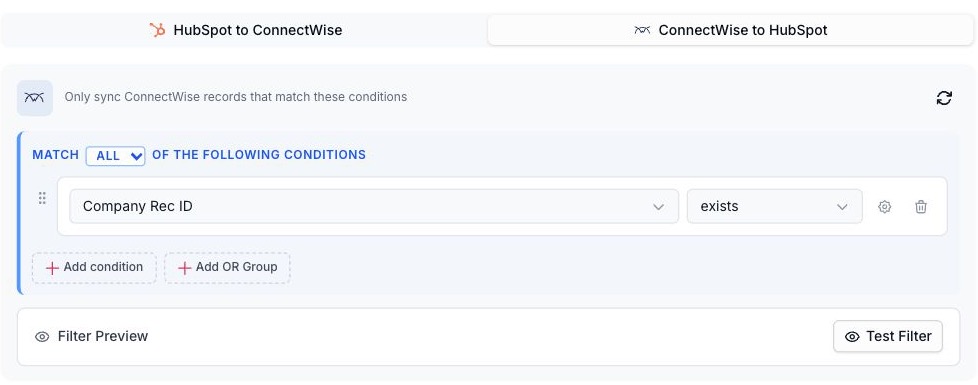
- Combine conditions with AND and OR.
- Test the filter before you publish.
Conditions that decide which records sync. ConnectWise + HubSpot shown.
Use a HubSpot list as the scope.
Sync only the records in a list your team already maintains.
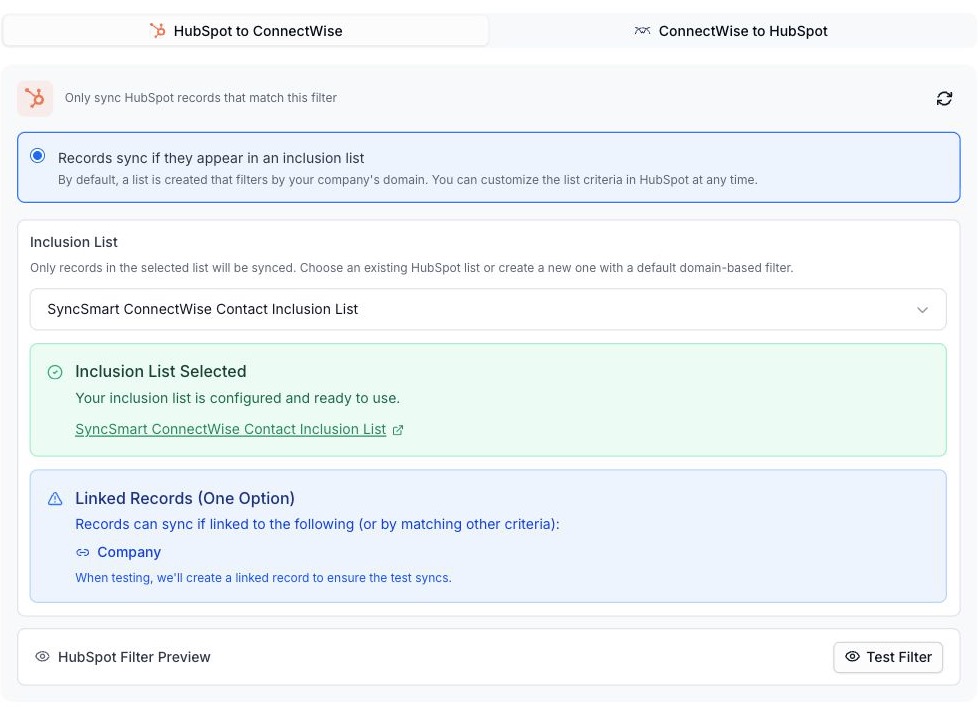
- Sync only the records in a HubSpot list your team already maintains.
- Linked records can qualify too.
A HubSpot list decides which records sync. ConnectWise + HubSpot shown.
See every sync.
Search by record and filter by status, direction and object.

- Search by record.
- Filter by status, direction, and object.
Sync logs. ConnectWise + HubSpot shown.
From first call to first sync
Connect, configure and validate the workflow before rollout.
-
Review your PSA workflow
Identify the companies, contacts, opportunities, products, and optional activity flows required by your teams.
-
Connect both systems
Prepare HubSpot access and the ConnectWise PSA API access needed for the agreed configuration.
-
Map, match, and validate
Review fields, stages, owners, company inclusion, existing record matches, and any historical sync before publishing.
-
Operate with visibility
Use sync logs and mapping history to investigate records and manage configuration changes.
Before you connect ConnectWise and HubSpot
Prerequisites, scope and the details that depend on your setup.
Ask on a callWhich ConnectWise product does this connect?
This package connects ConnectWise PSA, formerly ConnectWise Manage, with HubSpot. Review your account and environment with SyncSmart during setup.
Do all fields have to sync both ways?
No. Supported mappings can use different directions and field ownership rules. Products flow from ConnectWise into HubSpot; notes use the configured HubSpot-to-ConnectWise flow.
Can we limit the companies included?
Yes. Company inclusion controls and filters help define which customer records enter the configured sync.
Can we map custom fields?
Supported custom fields can be included. Review their types, direction, and any conditional rules during setup.
Are activities and notes included automatically?
These flows depend on the enabled configuration. Confirm required activity types, per-type direction, note scope, and record associations with the implementation team.
How do we review a problem record?
Search or filter the sync logs for the record and review its result. Mapping history and deployment records help explain configuration changes.
What should we confirm before setup?
Activity types and directions require separate configuration. Use ConnectWise PSA and prepare administrator-managed API access.
Which direction does data move?
Supported customer and sales mappings are bidirectional. Products move to HubSpot; notes move to ConnectWise.
Guides, demos and customer stories.
Discuss your ConnectWise + HubSpot setup.
Tell us how your team uses ConnectWise and HubSpot, which records need to move, and what should happen between them.
Thanks. Your request is with the SyncSmart team.
We reply by email to the address you gave. If you would rather talk sooner, pick a time on the calendar.
Book a 30-minute callYour request did not send.
Email [email protected] with what you need to connect, or pick a time on the calendar and we will take it from there.
Or book a 30-minute call
A 30-minute call on the calendar. You pick the slot; the invite arrives by email.